


软电话操作手册
推荐的手机软电话:Zoiper
安卓系统
1. APP 下载与安装
在 Google Play 上搜索 “Zoiper IAX SIP VOIP Softphone” 进行下载,或使用以下载链接直接下载: https://play.google.com/store/apps/details?id=com.zoiper.android.app&hl=zh
2.软电话配置
打开 Zoiper 应用并授予必要的权限
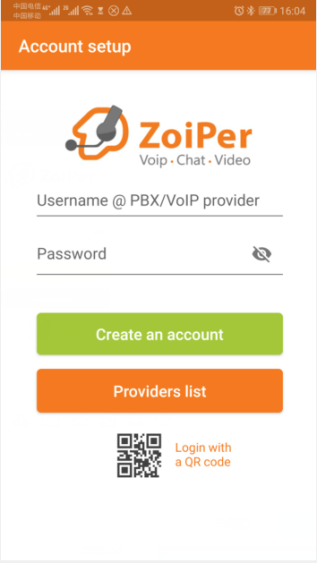
输入分机号和密码,然后点击“创建账户”(参见下图):
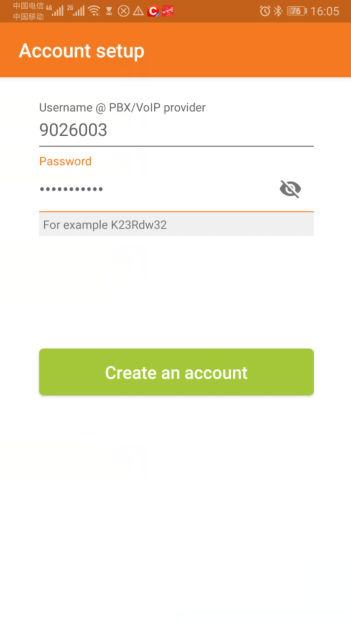
配置域名,然后点击下一步(参见下图)。


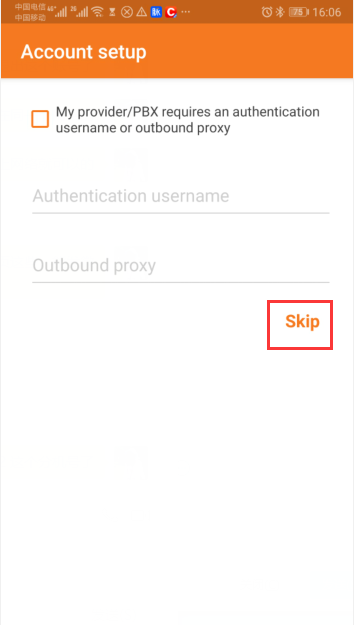
跳过提供商设置(参见下图)。
在“选择配置”下,等待协议选项加载完毕,选择合适的协议,然后点击完成。
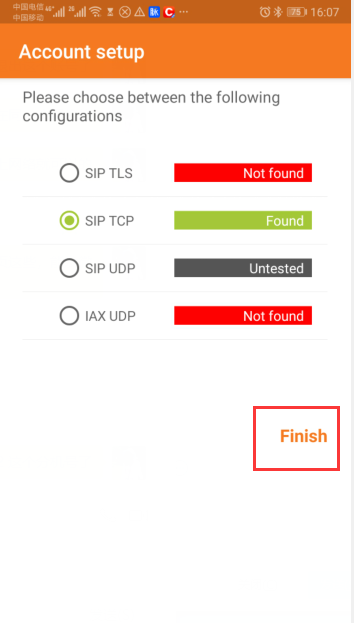
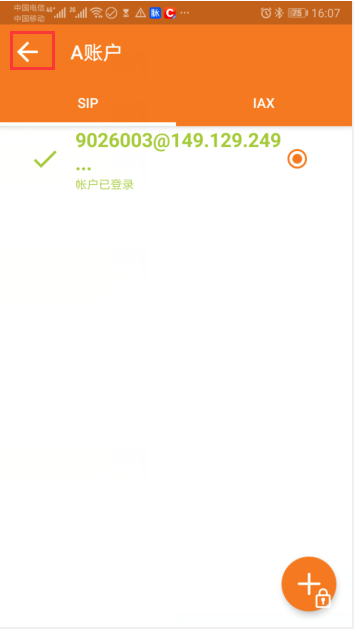
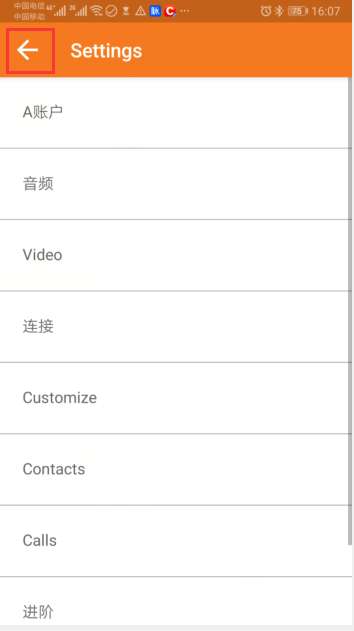
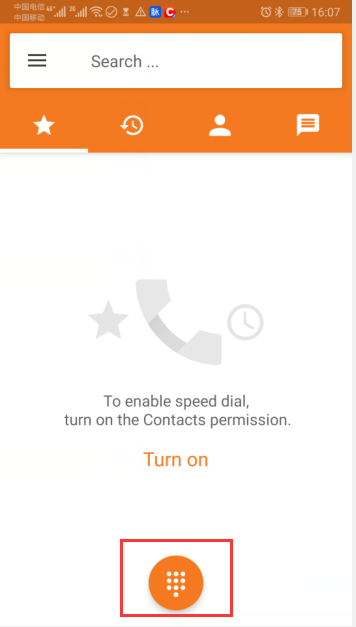
配置完成。返回主屏幕即可拨打电话。
注意:印度尼西亚号码以“8”开头,无需添加“0”或“62”等前缀(参见下图)。
三、 iOS 系统
1. APP 下载与安装
请使用非中文地区的 App Store 账号搜索 “Zoiper” 并下载该应用(参见下图)。
2. 软电话配置
打开 Zoiper,授予权限,然后依次进入:设置 > 账户 > “+” > 手动配置 > SIP 账户。
填写以下信息,然后点击“注册”:
| 名称 | 内容 |
|---|---|
| Account name | 填写我们提供的分机号 |
| Domain | 填写我们提供的域名 |
| User name | 填写我们提供的分机号 |
| Password | 填写我们提供的分机密码 |
具体操作截图如下


MicroSIP - PC 版
1、安装软电话——MicroSIP
安装软电话 —— MicroSIP 操作流程
打开我们提供的 MicroSIP 安装包进行安装。

请选择您自己的安装语言;

安装完成后,打开 MicroSIP 软件界面;
 *
*
2、软电话登录
注意:软电话登录主要用于外呼系统用户在接听来电后进行软电话操作。坐席人员可通过点击软电话上的“接听”或“拒绝”按钮,选择是否接听来电。因此,每位坐席人员均需登录一个软电话账户。默认情况下,一名坐席对应一个软电话账户。如需更多软电话账户,请与我们联系。
软电话配置操作步骤如下:
1。点击 MicroSIP 界面,点击下方三角形按钮中的“添加账户”(Add Account),弹出如下所示的配置界面;

2. 需要填写以下配置项:
账户名称:我们提供的软电话账户;
SIP 服务器:我们提供的服务器 IP 地址或域名;
用户名:我们提供的软电话账户;
域名:我们提供的服务器 IP 地址或域名;
登录名:我们提供的软电话账户;
密码:我们提供的软电话账户密码,需与对应的软电话账户匹配。
3.State description (as shown below)状态说明(如下图所示):
在线(Online):登录成功,可正常接听来电;
l禁止(Forbidden):软电话账户密码输入错误;*
l* *Forbidden:Softphone account password input error;

* InfinitySip -PC*
1、Install安装 InfinitySIP 客户端
Install安装软电话 Softphone ---—— InfinitySIP Operation Process操作流程
打开我们提供的
InfinitySIP安装包进行安装。
请选择您自己的安装语言;
 *
*
l* *Open the安装完成后,打开 InfinitySIP installation软件界面;
package provided by us to install

lChoose your own installation language;
l *
* *After installation, open the InfinitySIP software interface;
2、softphone login软电话登录
***Note: The softphone login is mainly used for the softphone and operation that the system outside call user can go to after answering. The operator can click the "answer" or "reject" button of the softphone to choose whether to answer the call. So each operator needs to log in to the softphone account. By default, an operator corresponds to a softphone account. If you need more softphone accounts, you can contact us.注意:软电话登录主要用于外呼系统用户在接听来电后进行相关操作。坐席人员可通过点击软电话界面上的“接听”或“拒绝”按钮,选择是否接听来电。因此,每位坐席人员均需登录一个软电话账户。默认情况下,一名坐席对应一个软电话账户。如需更多软电话账户,请与我们联系。
Soft phone configuration operations are as follows:*软电话配置操作步骤如下:
1. After安装 InfinitySip is后,默认会弹出一个需要登录的窗口;
installed by default, a pop-up window that requires login will pop up;

Need to fill in the configuration items:***需要填写以下配置项:
lAccount账户名称:我们提供的软电话账户;
Name:Softphone用户名:我们提供的软电话账户;
account域名:我们提供的服务器域名;
we密码:我们提供的软电话账户密码,需与对应的软电话账户匹配。
provide;
3.状态说明(如下图所示):
在线(Online):登录成功,可正常接听来电;
l*
禁止(Forbidden):软电话账户密码输入错误;
*Username:Softphone account we provide;
l* *Domain:The server domain name we provide;
l* *Password:The softphone account password we provide needs to correspond to the softphone account.
3.State description (as shown below):***
l* *Online:The login is successful and you can answer the call normally;
l* *Forbidden:Softphone account password input error;

(FAQ about Softphone)(软电话常见问题解答)
Commonly recommended softphones are mainly: MicroSIP, the following are the common problems of MicroSIP, but generally, the display of常用推荐的软电话主要有:MicroSIP。以下是 MicroSIP after的常见问题,但通常情况下,MicroSIP normal在正常登录后的界面显示如下:
login is as follows:

Summary of the problem of softphone not working normally:软电话无法正常工作的常见问题汇总:
***1、The softphone prompt:* Forbidden, usually the extension number password is entered incorrectly.*软电话提示:Forbidden
*
通常是因为分机号码或密码输入错误。
解决方法:请仔细检查分机密码的输入是否正确。如果您确认密码无误但仍提示 Solution: Check the input of the extension password. If you are sure that the password is correct and still prompt Forbidden, contact us“Forbidden”,请联系 Infinity for团队获取协助。
assistance. *
*
2、 The软电话提示:Gateway softphone prompts: ***when the gateway is wrong orError(网关错误)或 Bad Gateway, the main reason is the failure of the local outlet network connection.
* Solution: ***Check the local network environment of the login extension, you can try to restart the router.Gateway(错误网关)
主要原因是本地出口网络连接异常,导致无法正常连接到服务器。 解决方法:请检查登录分机所在设备的本地网络环境,可尝试重启路由器或切换至其他稳定网络后重试。

***3、The softphone prompts: ***When the application软电话提示:Application has expired orexpired(应用程序已过期)或 Application expired, the server may be requested to be temporarily unavailable.expired
*
可能是由于服务器端授权临时失效或服务暂不可用所致。
Solution: Contact us解决方法:请联系 Infinity for团队获取支持与协助。

4、 Softphone prompt: When the request timed out or 软电话提示:Request timed out, it may be caused by the local network, the softphone domain name may be incorrectly configured, or the corresponding server problem may be caused.out(请求超时)
Solution:
可能由以下原因导致:本地网络不稳定、软电话域名配置错误,或服务器端存在问题。
解决方法:
a.First check whether the softphone domain name configuration is wrong, if it is correct, please refer to the首先检查软电话中的域名配置是否正确。如果配置无误,请继续参考 b and和 c methods;
项;
b.To check检查本地网络是否正常,可在命令行中使用 whetherping the命令测试软电话所配置的域名,以确认当前网络连通性;
localc. network is normal, you can try to use the domain name configured by the softphone under the command Ping to check the current network status;
c.Contact us如问题仍未解决,请联系 Infinity for团队获取进一步协助。
assistance.

5、When the softphone prompts:* 软电话提示:Account or credential is disabled, it is mostly because the account has not been configured.*disabled(账户或凭据已被禁用)
通常是因为该账户尚未完成配置或未正确激活。 Solution:解决方法:
请重新配置账户信息:点击界面右上角的“下三角”按钮,选择“Add Account"Account”(添加账户),然后按照提示填写正确的账户参数(包括账户名、SIP to configure the account information.*服务器、用户名、域名和密码等)。

***6、Softphone prompt: ***软电话提示:Undefined external error. Generally, the softphone software is abnormal.error(未定义的外部错误)
通常是由软电话软件自身异常或安装不完整导致。 解决方法:
请卸载当前软电话软件,并重新安装最新版本的软电话程序。

7、 Solution: Reinstall the softphone software.软电话无法挂断通话
可能是软电话软件自身卡死或无响应。 解决方法:
请打开计算机的任务管理器,结束(强制关闭)软电话相关进程,然后重新启动软件并重新登录。

7、可能是当前安装的软电话软件存在异常或兼容性问题。 When解决方法:
the softphone cannot be hung up, it may be that the softphone software itself is stuck.
Solution: Open the task manager on the computer, kill the softphone process, and restart the login.
8、 The softphone point call does not respond, it may be that the softphone software is abnormal.
Solution: After uninstalling, download other versions of
请先卸载当前版本的 MicroSIP software软件,然后下载其他版本(如更早或更新的稳定版本)重新安装并配置。
