Manual Call API
- Extension Manage - Create extension group
- Extension Manage - delete extension group
- Extension Manage - Get extension list information
- Extension Manage - Extension checkout extension group
- Extension Manage - Extension check-in extension group
- Extension Manage - Extension idle and busy state setting
- Extension Manage - Get extension idle(busy status)
- Extension Manage - Get the list of extension groups
- Extension Manage - Get extension enabled status
- Extension Manage - Get extension call status
- Extension Manage - Get extension registration information
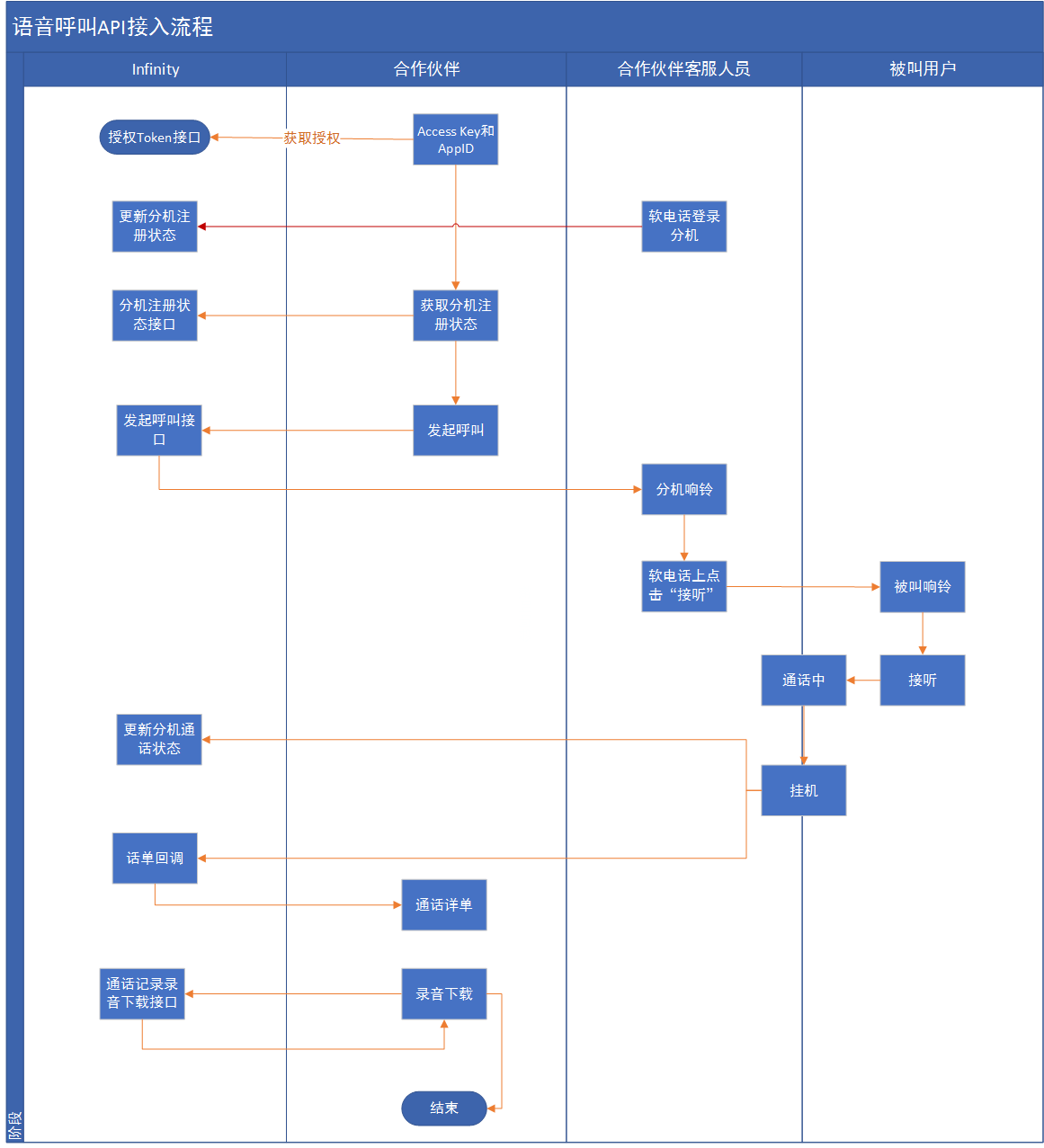
- Voice Call API - access process
- Voice Call API - Make a voice call
- Two-way call API access process
- Voice two-way calling - two-way call interface
- Voice verification code - error code information
- Voice verification code - voice verification code
Extension Manage - Create extension group
Interface Description
Create extension group
Request method
POST, form-data format
request parameters
| parameter name | type | Is it necessary | illustrate |
|---|---|---|---|
| service | string | yes | App.Sip_Extgroup.AddExtgroup |
| token | string | yes | The token obtained through the authorization interface |
| name | string | yes | extension group name |
| status | int | no | Extension group status: 1 enable; 0 disable, default 1 |
Interface request example(PHP)
<?php
    $apiUrl = 'http://127.0.0.1:8080';
    $postFields = [
        'service'   => 'App.Sip_Extgroup.AddExtgroup',
        'token'     => 'ABCDEFG',
        'name'  => 'abcdefg',
        'status'  => 1
    ];
    $curl = curl_init();
    curl_setopt($curl, CURLOPT_URL, $apiUrl);
    curl_setopt($curl, CURLOPT_POST, 1);
    curl_setopt($curl, CURLOPT_POSTFIELDS, $postFields);
    curl_setopt($curl, CURLOPT_RETURNTRANSFER, 1);
    $response = curl_exec($curl);
    $curlError = curl_error($curl);
    curl_close($curl);
    var_dump($response);
?>
return data structure example
{
    "ret": 200,
    "data": {
        "status": 0,
        "desc": "Extension group added successfully",
        "reqtime": 1581410934,
        "rsptime": 1581410934
    },
    "msg": ""
}
Return data field description
| field | illustrate |
|---|---|
Extension Manage - delete extension group
Interface Description
delete extension group
Request method
POST, form-data format
request parameters
| parameter name | type | Is it necessary | illustrate |
|---|---|---|---|
| service | string | yes | App.Sip_Extgroup.DelExtgroup |
| token | string | yes | The token obtained through the authorization interface |
| name | string | yes | extension group name |
Interface request example(PHP)
<?php
    $apiUrl = 'http://127.0.0.1:8080';
    $postFields = [
        'service'   => 'App.Sip_Extgroup.DelExtgroup',
        'token'     => 'ABCDEFG',
        'name'  => 'abcdefg',
    ];
    $curl = curl_init();
    curl_setopt($curl, CURLOPT_URL, $apiUrl);
    curl_setopt($curl, CURLOPT_POST, 1);
    curl_setopt($curl, CURLOPT_POSTFIELDS, $postFields);
    curl_setopt($curl, CURLOPT_RETURNTRANSFER, 1);
    $response = curl_exec($curl);
    $curlError = curl_error($curl);
    curl_close($curl);
    var_dump($response);
?>
return data structure example
{
    "ret":200,
    "data":{
        "status":0,
        "desc":"successfully deleted",
        "reqtime":1581409781,
        "rsptime":1581409781
    },
    "msg":""
}
Return data field description
| field | illustrate |
|---|---|
Extension Manage - Get extension list information
Interface Description
Get the extension list information owned by the user。
Request method
POST, form-data format
request parameters
| parameter name | type | Is it necessary | illustrate |
|---|---|---|---|
| service | string | yes | App.Sip_Sipnum.GetSipnumberInfo |
| token | string | yes | The token obtained through the authorization interface |
| status | int | yes | extension status. 1: enable (default), 2: disable, 3: all |
| extnumber | string | yes | Extension number, empty to get all |
Interface request example(PHP)
<?php
    $apiUrl = 'http://127.0.0.1:8080';
    $postFields = [
        'service'   => 'App.Sip_Sipnum.GetSipnumberInfo',
        'token'     => 'ABCDEFG',
        'status'    => 3,
        'extnumber'  => '100001'
    ];
    $curl = curl_init();
    curl_setopt($curl, CURLOPT_URL, $apiUrl);
    curl_setopt($curl, CURLOPT_POST, 1);
    curl_setopt($curl, CURLOPT_POSTFIELDS, $postFields);
    curl_setopt($curl, CURLOPT_RETURNTRANSFER, 1);
    $response = curl_exec($curl);
    $curlError = curl_error($curl);
    curl_close($curl);
    var_dump($response);
?>
return data structure example
{
    "ret": 200,
    "data": {
        "status": 0,
        "desc": "get success",
        "result": [
            {
                "extnumber": "100001",
                "password": "100001",
                "status": 1016,
                "register": "nreg"
            }
        ],
        "reqtime": 1581506241,
        "rsptime": 1581506241
    },
    "msg": ""
}
Return parameter description
| parameter name | type | illustrate |
|---|---|---|
| result | array | extension list array |
| —extnumber | string | Ext |
| —password | string | Extension login password |
| —status | int | Extension Status |
| —register | string | Extension registration status. nreg: not registered; reg: registered |
Extension Manage - Extension checkout extension group
Interface Description
Check out the extension under the current user from the extension group
Request method
POST, form-data format
request parameters
| parameter name | type | Is it necessary | illustrate |
|---|---|---|---|
| service | string | yes | App.Sip_Extgroup.DelExtnumber |
| token | string | yes | The token obtained through the authorization interface |
| name | string | yes | extension group name |
| extnumber | string | yes | Ext |
Interface request example(PHP)
<?php
    $apiUrl = 'http://127.0.0.1:8080';
    $postFields = [
        'service'   => 'App.Sip_Extgroup.DelExtnumber',
        'token'     => 'ABCDEFG',
        'name'  => 'abcdefg',
        'extnumber'  => 'abcdefg'
    ];
    $curl = curl_init();
    curl_setopt($curl, CURLOPT_URL, $apiUrl);
    curl_setopt($curl, CURLOPT_POST, 1);
    curl_setopt($curl, CURLOPT_POSTFIELDS, $postFields);
    curl_setopt($curl, CURLOPT_RETURNTRANSFER, 1);
    $response = curl_exec($curl);
    $curlError = curl_error($curl);
    curl_close($curl);
    var_dump($response);
?>
return data structure example
{
    "ret": 200,
    "data": {
        "status": 0,
        "desc": "successfully deleted",
        "reqtime": 1581409508,
        "rsptime": 1581409508
    },
    "msg": ""
}
Return data field description
| field | type | illustrate |
|---|---|---|
| desc | string | return description |
Extension Manage - Extension check-in extension group
Interface Description
Sign in an extension under the current user to an extension group owned by the user
Request method
POST, form-data format
request parameters
| parameter name | type | Is it necessary | illustrate |
|---|---|---|---|
| service | string | yes | App.Sip_Extgroup.AddExtnumber |
| token | string | yes | The token obtained through the authorization interface |
| name | string | yes | extension group name |
| extnumber | string | yes | Ext |
Interface request example(PHP)
<?php
    $apiUrl = 'http://127.0.0.1:8080';
    $postFields = [
        'service'   => 'App.Sip_Extgroup.AddExtnumber',
        'token'     => 'ABCDEFG',
        'name'  => 'abcdefg',
        'extnumber'  => 'abcdefg'
    ];
    $curl = curl_init();
    curl_setopt($curl, CURLOPT_URL, $apiUrl);
    curl_setopt($curl, CURLOPT_POST, 1);
    curl_setopt($curl, CURLOPT_POSTFIELDS, $postFields);
    curl_setopt($curl, CURLOPT_RETURNTRANSFER, 1);
    $response = curl_exec($curl);
    $curlError = curl_error($curl);
    curl_close($curl);
    var_dump($response);
?>
return data structure example
{
    "ret": 200,
    "data": {
        "status": 0,
        "desc": "Added successfully",
        "reqtime": 1581409508,
        "rsptime": 1581409508
    },
    "msg": ""
}
Return data field description
| field | type | illustrate |
|---|---|---|
| desc | string | return description |
Extension Manage - Extension idle and busy state setting
Interface Description
Set the free/busy status of the extension
Request method
POST, form-data format
request parameters
| parameter name | type | Is it necessary | illustrate |
|---|---|---|---|
| service | string | yes | App.Sip_Extgroup.EditExtnumber |
| token | string | yes | The token obtained through the authorization interface |
| name | string | yes | extension group name |
| extnumber | string | yes | Ext |
| state | string | yes | Extension status idle: idle; busy: busy |
Interface request example(PHP)
<?php
    $apiUrl = 'http://127.0.0.1:8080';
    $postFields = [
        'service'   => 'App.Sip_Extgroup.EditExtnumber',
        'token'     => 'ABCDEFG',
        'name'  => 'abcdefg',
        'extnumber'  => '100001',
        'state'  => 'idle'
    ];
    $curl = curl_init();
    curl_setopt($curl, CURLOPT_URL, $apiUrl);
    curl_setopt($curl, CURLOPT_POST, 1);
    curl_setopt($curl, CURLOPT_POSTFIELDS, $postFields);
    curl_setopt($curl, CURLOPT_RETURNTRANSFER, 1);
    $response = curl_exec($curl);
    $curlError = curl_error($curl);
    curl_close($curl);
    var_dump($response);
?>
return data structure example
{
    "ret": 200,
    "data": {
        "status": 0,
        "desc": "Successfully modified",
        "reqtime": 1581409508,
        "rsptime": 1581409508
    },
    "msg": ""
}
Return data field description
| field | type | illustrate |
|---|---|---|
| desc | string | return description |
Extension Manage - Get extension idle(busy status)
Interface Description
Get the extension status in the extension group
Request method
POST, form-data format
request parameters
| parameter name | type | Is it necessary | illustrate |
|---|---|---|---|
| service | string | yes | App.Sip_Extgroup.GetGroupExt |
| token | string | yes | The token obtained through the authorization interface |
| name | string | no | Extension group name, if it is empty, all extension group data of the current user will be obtained |
| extnumber | string | no | Extension number, if it is empty, all extension data of the current user will be obtained |
Interface request example(PHP)
<?php
    $apiUrl = 'http://127.0.0.1:8080';
    $postFields = [
        'service'   => 'App.Sip_Extgroup.GetGroupExt',
        'token'     => 'ABCDEFG',
        'name'  => 'abcdefg',
        'extnumber'  => 'abcdefg'
    ];
    $curl = curl_init();
    curl_setopt($curl, CURLOPT_URL, $apiUrl);
    curl_setopt($curl, CURLOPT_POST, 1);
    curl_setopt($curl, CURLOPT_POSTFIELDS, $postFields);
    curl_setopt($curl, CURLOPT_RETURNTRANSFER, 1);
    $response = curl_exec($curl);
    $curlError = curl_error($curl);
    curl_close($curl);
    var_dump($response);
?>
return data structure example
{
    "ret": 200,
    "data": [
        {
            "name": "autocall-9026",
            "extnumber": "9026004",
            "status": "hangup",
            "priority": 1,
            "linkcount": 0,
            "date": null,
            "state": "idle"
        }
    ],
    "msg": ""
}
Return data field description
| field | type | illustrate |
|---|---|---|
| data | string | extension data array |
| —name | string | extension group name |
| —extnumber | string | Ext |
| —status | string | Extension status answer: answer; hangup: hang up |
| —priority | string | priority |
| —linkcount | string | call time |
| —date | string | update time |
| —state | string | Extension idle/busy status idle: idle; busy: busy |
Extension Manage - Get the list of extension groups
Interface Description
Get the list of extension groups owned by the current user
Request method
POST, form-data format
request parameters
| parameter name | type | Is it necessary | illustrate |
|---|---|---|---|
| service | string | yes | App.Sip_Extgroup.GetExtgroupInfo |
| token | string | yes | The token obtained through the authorization interface |
| name | string | no | Extension group name, if it is empty, get all |
Interface request example(PHP)
<?php
    $apiUrl = 'http://127.0.0.1:8080';
    $postFields = [
        'service'   => 'App.Sip_Extgroup.GetExtgroupInfo',
        'token'     => 'ABCDEFG',
        'name'  => 'abcdefg',
    ];
    $curl = curl_init();
    curl_setopt($curl, CURLOPT_URL, $apiUrl);
    curl_setopt($curl, CURLOPT_POST, 1);
    curl_setopt($curl, CURLOPT_POSTFIELDS, $postFields);
    curl_setopt($curl, CURLOPT_RETURNTRANSFER, 1);
    $response = curl_exec($curl);
    $curlError = curl_error($curl);
    curl_close($curl);
    var_dump($response);
?>
return data structure example
{
    "ret": 200,
    "data": {
        "status": 0,
        "desc": "获取成功",
        "result": [
            {
                "id": 18,
                "name": "test-group-3",
                "status": 1042
            }
        ],
        "reqtime": 1581408746,
        "rsptime": 1581408746
    },
    "msg": ""
}
return field description
| field | type | illustrate |
|---|---|---|
| result | string | extension list array |
| —id | string | extension group id |
| —name | string | extension group name |
| —status | string | Extension group status |
Extension Manage - Get extension enabled status
Interface Description
Get the extension list information owned by the user.
Request method
POST, form-data format
request parameters
| parameter name | type | Is it necessary | illustrate |
|---|---|---|---|
| service | string | yes | App.Sip_Status.GetSipValidStatus |
| token | string | yes | The token obtained through the authorization interface |
| extnumber | string | yes | Extension number, multiple extension numbers are separated by commas |
Interface request example(PHP)
<?php
    $apiUrl = 'http://127.0.0.1:8080';
    $postFields = [
        'service'   => 'App.Sip_Status.GetSipValidStatus',
        'token'     => 'ABCDEFG',
        'extnumber'  => '100001'
    ];
    $curl = curl_init();
    curl_setopt($curl, CURLOPT_URL, $apiUrl);
    curl_setopt($curl, CURLOPT_POST, 1);
    curl_setopt($curl, CURLOPT_POSTFIELDS, $postFields);
    curl_setopt($curl, CURLOPT_RETURNTRANSFER, 1);
    $response = curl_exec($curl);
    $curlError = curl_error($curl);
    curl_close($curl);
    var_dump($response);
?>
return data structure example
{
    "ret": 200,
    "data": {
        "status": 0,
        "desc": "get success",
        "result": [
            {
                "extnumber": "90170002",
                "code": 1016
            }
        ],
        "reqtime": 1581508401,
        "rsptime": 1581508401
    },
    "msg": ""
}
Return parameter description
| parameter name | type | illustrate |
|---|---|---|
| result | array | extension data array |
| —extnumber | string | Ext |
| —code | int | Extension Status |
Extension Manage - Get extension call status
Interface Description
Get the extension list information owned by the user.
Request method
POST, form-data format
request parameters
| parameter name | type | Is it necessary | illustrate |
|---|---|---|---|
| service | string | yes | App.Sip_Status.GetSipCallStatus |
| token | string | yes | The token obtained through the authorization interface |
| extnumber | string | yes | Extension number, multiple extension numbers are separated by commas |
Interface request example(PHP)
<?php
    $apiUrl = 'http://127.0.0.1:8080';
    $postFields = [
        'service'   => 'App.Sip_Status.GetSipCallStatus',
        'token'     => 'ABCDEFG',
        'extnumber'  => '100001'
    ];
    $curl = curl_init();
    curl_setopt($curl, CURLOPT_URL, $apiUrl);
    curl_setopt($curl, CURLOPT_POST, 1);
    curl_setopt($curl, CURLOPT_POSTFIELDS, $postFields);
    curl_setopt($curl, CURLOPT_RETURNTRANSFER, 1);
    $response = curl_exec($curl);
    $curlError = curl_error($curl);
    curl_close($curl);
    var_dump($response);
?>
return data structure example
{
    "ret": 200,
    "data": {
        "status": 0,
        "desc": "get success",
        "result": [
            {
                "extnumber": "90170002",
                "status": 1014,
                "caller": null,
                "callee": null,
                "disnumber": null,
                "direction": null,
                "channel": null,
                "idleduration": null,
                "callduration": null
            }
        ],
        "reqtime": 1581506689,
        "rsptime": 1581506689
    },
    "msg": ""
}
Return parameter description
| parameter name | type | illustrate |
|---|---|---|
| result | array | extension data array |
| —extnumber | string | Ext |
| —status | int | Extension Status |
| —caller | string | caller |
| —callee | string | called person |
| —disnumber | string | display number |
| —direction | string | call direction |
| —channel | string | channel |
| —idleduration | int | idle time |
| —callduration | int | call time |
Extension Manage - Get extension registration information
Interface Description
Get the extension list information owned by the user.
Request method
POST, form-data format
request parameters
| parameter name | type | Is it necessary | illustrate |
|---|---|---|---|
| service | string | yes | App.Sip_Status.GetSipRegisterStatus |
| token | string | yes | The token obtained through the authorization interface |
| extnumber | string | yes | Extension number, multiple extension numbers are separated by commas |
Interface request example(PHP)
<?php
    $apiUrl = 'http://127.0.0.1:8080';
    $postFields = [
        'service'   => 'App.Sip_Status.GetSipRegisterStatus',
        'token'     => 'ABCDEFG',
        'extnumber'  => '100001'
    ];
    $curl = curl_init();
    curl_setopt($curl, CURLOPT_URL, $apiUrl);
    curl_setopt($curl, CURLOPT_POST, 1);
    curl_setopt($curl, CURLOPT_POSTFIELDS, $postFields);
    curl_setopt($curl, CURLOPT_RETURNTRANSFER, 1);
    $response = curl_exec($curl);
    $curlError = curl_error($curl);
    curl_close($curl);
    var_dump($response);
?>
return data structure example
{
    "ret": 200,
    "data": {
        "status": 0,
        "desc": "get success",
        "result": [
            {
                "extnumber": "90170002",
                "code": 1014,
                "clientip": null,
                "serverip": null
            }
        ],
        "reqtime": 1581507361,
        "rsptime": 1581507361
    },
    "msg": ""
}
Return parameter description
| parameter name | type | illustrate |
|---|---|---|
| result | array | extension data array |
| —extnumber | string | Ext |
| —code | int | Extension Status |
| —clientip | string | Extension registration client IP |
| —serverip | string | Extension registration server IP |
Voice Call API - access process
Voice Call API - Make a voice call
Interface Description
Initiate a call directly to a number, most of which are applicable to calling the interface after clicking "Call" on the web page.
Request method
POST, form-data format
request parameters
| parameter name | type | Is it necessary | illustrate |
|---|---|---|---|
| service | string | 是 | App.Sip_Call.MakeCall |
| token | string | 是 | The token obtained through the authorization interface |
| extnumber | string | 是 | Ext |
| destnumber | string | 是 | target number |
| disnumber | string | 否 | Caller ID, if left blank, a random caller ID will be selected |
| userid | string | 否 | Custom parameters (employee id) |
| chengshudu | string | 否 | Custom parameters (maturity) |
| memberid | string | 否 | Custom parameters (member id) |
| customuuid | string | 否 | Custom parameters (customer id) |
Interface request example(PHP)
<?php
    $apiUrl = 'http://127.0.0.1:8080';
    $postFields = [
        'service'   => 'App.Sip_Call.MakeCall',
        'token'     => 'ABCDEFG',
        'extnumber'  => 'abcdefg',
        'destnumber'  => 'abcdefg',
        'disnumber'  => 'abcdefg',
        'userid'  => 'abcdefg',
        'chengshudu'  => 'abcdefg',
        'memberid'  => 'abcdefg',
        'customuuid'  => 'abcdefg',
    ];
    $curl = curl_init();
    curl_setopt($curl, CURLOPT_URL, $apiUrl);
    curl_setopt($curl, CURLOPT_POST, 1);
    curl_setopt($curl, CURLOPT_POSTFIELDS, $postFields);
    curl_setopt($curl, CURLOPT_RETURNTRANSFER, 1);
    $response = curl_exec($curl);
    $curlError = curl_error($curl);
    curl_close($curl);
    var_dump($response);
?>
return data structure example
{
    "ret": 200,
    "data": {
        "status": 0,
        "desc": "Call command sent successfully",
        "reqtime": 1581389402,
        "rsptime": 1581389402
    },
    "msg": ""
}
Two-way call API access process
Two-way call API access process
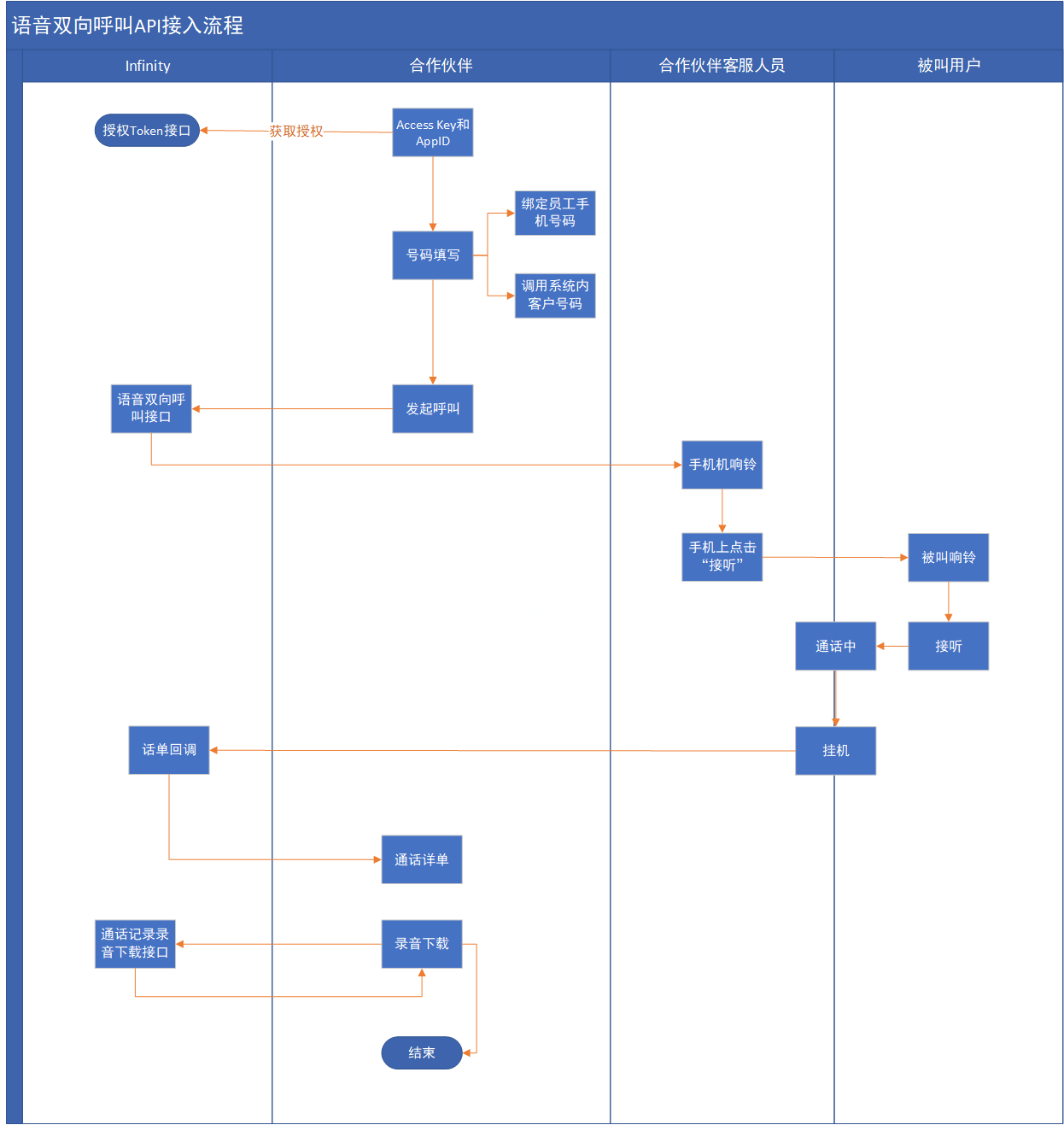
Voice two-way calling - two-way call interface
Interface Description:
The two-way call is mainly used to call the customer service number of the company first, and then call the called customer number after the connection is made.
Request method
POST, form-data format
request parameters
| parameter name | type | Is it necessary | illustrate |
|---|---|---|---|
| service | string | yes | App.Sip_Call.DoubleCall |
| token | string | yes | Token, minimum: 32; maximum 32 |
| extnumber | string | yes | Extension Number |
| anumber | string | yes | Employee Mobile Number |
| bnumber | string | yes | called customer number |
| disnumber | string | no | Displayed calling number, leave it blank and pick a random calling number |
| userid | string | no | Custom Data (Employee ID) |
| memberid | string | no | Custom Data (Member ID) |
| chengshudu | string | no | Custom Data (Maturity) |
| customuuid | string | no | Custom Data (Customer ID) |
Interface request example(PHP)
<?php
    $apiUrl = 'http://127.0.0.1:8080';
    $postFields = [
        'service'   => 'App.Sip_Call.DoubleCall',
        'token'     => 'ABCDEFG',
        'extnumber'  => 'abcdefg',
        'anumber'  => 'abcdefg',
        'bnumber'  => 'abcdefg',
        'disnumber'  => 'abcdefg',
        'userid'  => 'abcdefg',
        'memberid'  => 'abcdefg',
        'chengshudu'  => 'abcdefg',
        'customuuid'  => 'abcdefg'
    ];
    $curl = curl_init();
    curl_setopt($curl, CURLOPT_URL, $apiUrl);
    curl_setopt($curl, CURLOPT_POST, 1);
    curl_setopt($curl, CURLOPT_POSTFIELDS, $postFields);
    curl_setopt($curl, CURLOPT_RETURNTRANSFER, 1);
    $response = curl_exec($curl);
    $curlError = curl_error($curl);
    curl_close($curl);
    var_dump($response);
?>
return data structure example
{
    "ret": 200,
    "data": {
        "status": 0,
        "desc": "The double call command is sent successfully",
        "reqtime": 1584953473,
        "rsptime": 1584953473
    },
    "msg": ""
}
Voice verification code - error code information
error code information
A brief description:
- error code information
| error code | illustrate |
|---|---|
| 1000 | system error |
| 1001 | Parameter error |
Voice verification code - voice verification code
Request URL
http://platform.infin8linx.com/api/voiceCode
request method
- POST
parameter
| parameter name | type | Is it necessary | illustrate |
|---|---|---|---|
| appid | yes | string | authentication appid |
| accesskey | yes | string | authentication accesskey |
| code | yes | string | Verification code 4 valid digits |
| phone | yes | string | The mobile phone number to receive the verification code Indonesian and Mexican mobile phone numbers do not need to add a country number. For example, if the complete number is: 0062 8123456789, you can directly request with 8123456789. |
| nationCode | yes | string | Language version en:English id:Indonesian sp:Spanish |
return example
{
    "code": 1,
    "msg": "successful request",
    "data": {
        "customuuid":"123123"
    }
}
Return parameter description
| parameter name | type | illustrate |
|---|---|---|
| code | int | Return code 1 is success, others are failure |
| msg | string | returned messages |
| data | object | return data |
| —customuuid | string | task unique id |