IVR API
- Batch IVR - Call out ivr voice in batches
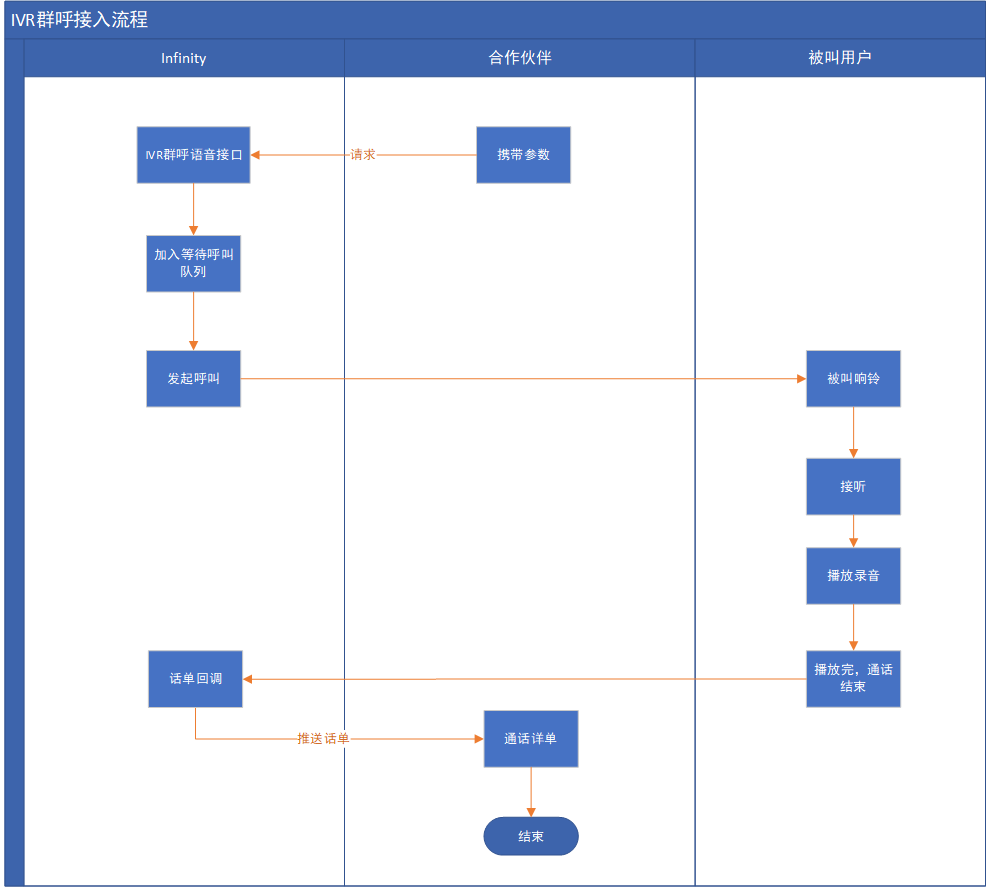
- Batch IVR - IVR group call access process
- Commo API - API for getting call records
- Common API - Call recording download link interface
- Common API - Clear the Token interface
- Common API - Global error and status codes
- Common API - Obtain authorization token interface
- Common API - call record callback parameters
Batch IVR - Call out ivr voice in batches
Interface Description
For different numbers that need to play the same IVR voice content, you can use this interface to make calls in batches, and a single submission should not exceed 5000 numbers.
Request method
POST, form-data format
Request URL:
http://platform.infin8linx.com/api/yunhu
request parameters
| parameter name | type | Is it necessary | illustrate |
|---|---|---|---|
| service | string | yes | App.Sip_Call.PlayVoice |
| appid | string | yes | authorized appid |
| accesskey | string | yes | authorized accesskey |
| nationcode | string | yes | Country shortcode in: India id: Indonesia ph: Philippines mx: Mexico co: Colombia tha: Thailand |
| destnumber | string | yes | Target number, connect multiple numbers with "," |
| voicetype | int | yes | The audio file type to play. 1: offline voice file, 2: online voice (url) |
| voicefile | string | yes | Offline audio file name or online voice url address |
| userkey | int | no | Whether user buttons are required, 1: required, 0 not required, default 0 |
| chengshudu | string | no | Customer-defined data, returned as it is in the callback data after the call ends. |
| disnumber | string | no | Caller ID, if left blank, a random caller ID will be selected |
| customuuid | string | no | Customer-defined data, returned as it is in the callback data after the call ends |
| waittime | int | no | call waiting time |
| conntime | int | no | call airtime |
| todayonly | int | no | Whether the number submitted on the day is only dialed on the same day 1: Yes, the number that has not been called on the day will be kicked out of the queue directly 2: No, the number that has not been called on the day will continue to call the next day, and the default is 1 if it is not transmitted |
Interface request example(PHP)
<?php
    $apiUrl = 'http://127.0.0.1:8080';
    $postFields = [
        'service'   => 'App.Sip_Call.PlayVoice',
        'appid'     => 'ABCDEFG',
        'accesskey'     => 'ABCDEFG',
        'nationcode'     => 'id',
        'destnumber'  => '133,134,135,135',
        'voicetype'  => 'abcdefg',
        'voicefile'  => 'abcdefg',
        'chengshudu'  => 'abcdefg',
        'disnumber'  => 'abcdefg',
        'customuuid'  => 'abcdefg',
        'waittime'  => 60,
        'conntime'  => 60,
        'todayonly'  => 1,
    ];
    $curl = curl_init();
    curl_setopt($curl, CURLOPT_URL, $apiUrl);
    curl_setopt($curl, CURLOPT_POST, 1);
    curl_setopt($curl, CURLOPT_POSTFIELDS, $postFields);
    curl_setopt($curl, CURLOPT_RETURNTRANSFER, 1);
    $response = curl_exec($curl);
    $curlError = curl_error($curl);
    curl_close($curl);
    var_dump($response);
?>
return data structure example
{
    "code": 200,
    "msg": "successful request",
    "data": {
        "desc": "Play command sent successfully",
        "reqtime": 1588836407,
        "rsptime": 1588836407
    }
}
Return parameter description
| parameter name | type | illustrate |
|---|---|---|
| code | int | return code 200 success |
| msg | string | return prompt information |
| data | object | return data object |
| —desc | string | request hints |
| —reqtime | int | request timestamp |
| —rsptime | int | return timestamp |
Batch IVR - IVR group call access process
IVR group call access process
Recording file preparation before access: Before the interface request, please use the account password provided by Infinity to log in to the background, and find the menu "Record Template (offline)" on the left side of the Voice background, here Upload the recording file to be used by the interface.
Requirements for recording files: sampling rate 8000bps, mp3 format, file name cannot contain Chinese, English and "_" symbols are allowed.
Commo API - API for getting call records
Interface description
the interface for the customer to actively pull the list of call records.
Request method
POST, form-data format
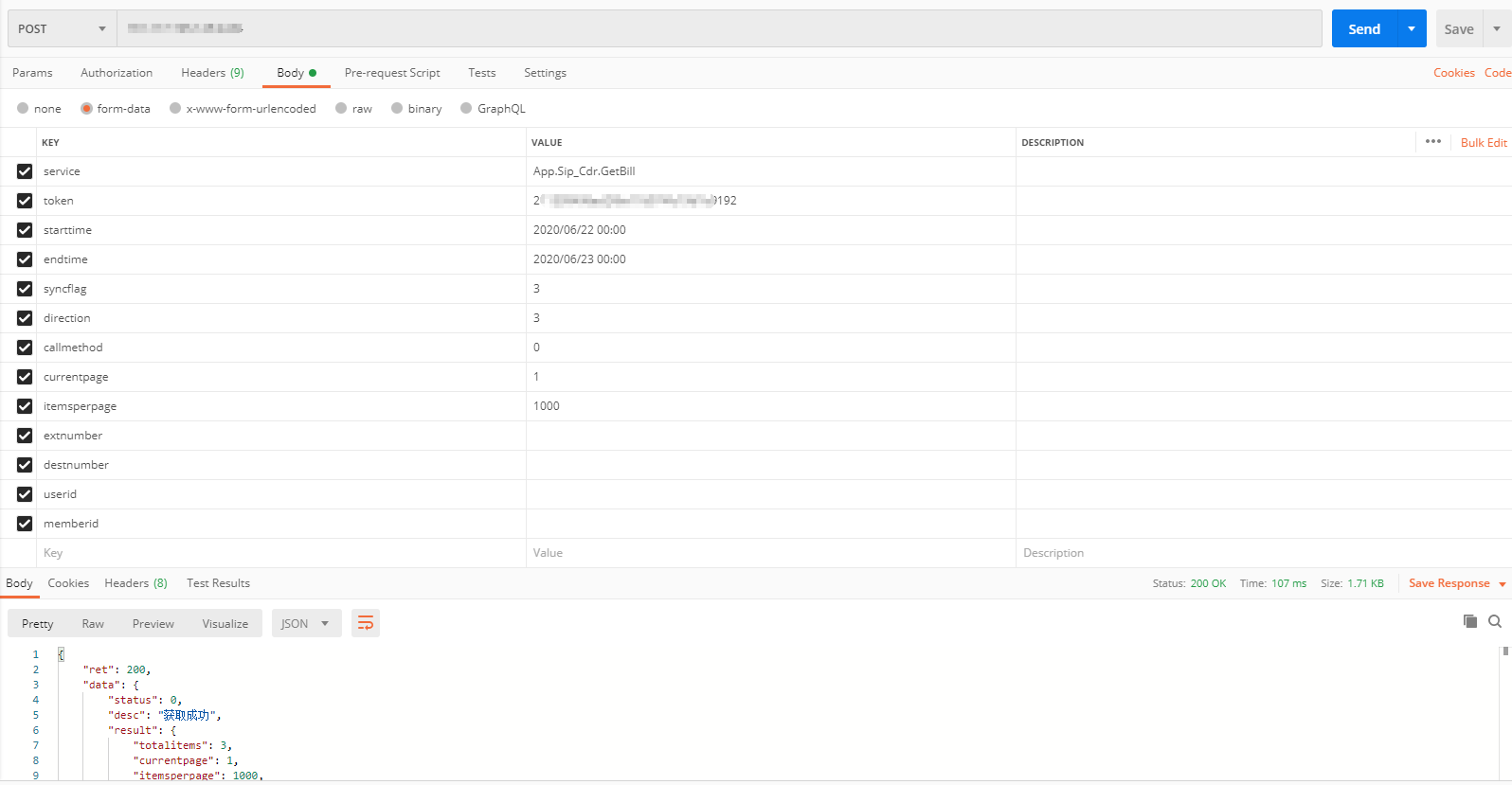
Get call record interface request parameters
| parameter name | type | Is it necessary | illustrate |
|---|---|---|---|
| service | string | yes | App.Sip_Cdr.GetBill |
| token | string | yes | The token obtained through the authorization interface |
| starttime | string | yes | (Dial) start time, format:yyyy-mm-dd hh:mm:ss |
| endtime | string | yes | (Dial) end time, format:yyyy-mm-dd hh:mm:ss |
| syncflag | int | yes | Get record type: 1. Get unqueried records (default); 2. Get queried records; 3. Get all records. |
| direction | int | yes | Call direction: 1. Incoming; 2. Outgoing; 3. All (default). |
| callmethod | int | yes | Call method: 0, unlimited; 1, mutual extension dial; 2, extension direct dial (manual dial); 3, API call (default); 4, API double call; 5, predictive outbound call; 6, IVR/group call . |
| currentpage | int | yes | number of pages, default: 1 |
| itemsperpage | int | yes | Number per page, default: 10, minimum: 1; maximum: 1000 |
| extnumber | string | yes | Extension number, multiple extension numbers are separated by English commas, when passing a null value, it is all |
| destnumber | string | yes | The target number of the call, when passing a null value, it is all |
| userid | string | yes | Custom data (employee ID), nullable |
| memberid | string | yes | Custom data (member ID), can be empty |
| chengshudu | string | no | Custom Data (Maturity) |
| customuuid | string | no | Custom Data (Customer ID) |
API Request Example for Obtaining Call Records(PHP)
<?php
    $apiUrl = 'http://127.0.0.1:8080';
    $postFields = [
        'service'   => 'App.Sip_Cdr.GetBill',
        'token'     => 'ABCDEFG',
        'starttime'  => '2019-01-12 00:00:00',
        'endtime'    => '2020-12-12 00:00:00',
        'direction'  => 3
        'syncflag'   => 3,
        'callmethod' => 0,
        'currentpage'  => 1,
        'itemsperpage'  => 10,
    ];
    $curl = curl_init();
    curl_setopt($curl, CURLOPT_URL, $apiUrl);
    curl_setopt($curl, CURLOPT_POST, 1);
    curl_setopt($curl, CURLOPT_POSTFIELDS, $postFields);
    curl_setopt($curl, CURLOPT_RETURNTRANSFER, 1);
    $response = curl_exec($curl);
    $curlError = curl_error($curl);
    curl_close($curl);
    var_dump($response);
?>
return data structure example
{
    "ret": 200,
    "data": {
        "status": 0,
        "desc": "get success",
        "result": {
            "totalitems": 8151,
            "currentpage": 1,
            "itemsperpage": 10,
            "bills": [
                {
                    "id": 22670,
                    "extnumber": "",
                    "destnumber": "13387525701",
                    "displaynumber": "2190170001",
                    "starttime": "2019-09-27 14:58:37",
                    "answertime": null,
                    "endtime": "2019-09-27 14:59:05",
                    "duration": 28,
                    "billsec": 0,
                    "direction": "callout",
                    "callmethod": 6,
                    "userid": "0",
                    "memberid": "0",
                    "chengshudu": "0",
                    "customuuid": "0",
                    "recordfilename": "",
                    "downloadip": "",
                    "hangupdirection": 10041,
                    "hangupcause": 10020,
                    "userkey":"#"
                }
            ]
        },
        "reqtime": 1581502410,
        "rsptime": 1581502410
    },
    "msg": ""
}
Return parameter description
| parameter name | type | illustrate |
|---|---|---|
| result | objest | returned result set |
| —totalitems | int | total number of records |
| —currentpage | int | current page number |
| —itemsperpage | int | Quantity per page |
| —bills | array | record array |
| ——id | int | record id |
| ——extnumber | string | Ext |
| ——destnumber | string | target number |
| ——displaynumber | string | display number |
| ——starttime | string | call time |
| ——answertime | string | response time |
| ——endtime | string | call end time |
| ——duration | int | call waiting time |
| ——billsec | int | call time |
| ——direction | string | call direction |
| ——callmethod | int | call method |
| ——userid | string | Custom parameter (user id) |
| ——memberid | string | Custom parameters (member id) |
| ——chengshudu | string | Custom parameters (maturity) |
| ——customuuid | string | Custom parameters (customer id) |
| ——recordfilename | string | call log file name |
| ——downloadip | string | download ip |
| ——hangupdirection | int | hang up directions |
| ——hangupcause | int | hang up reason |
| ——userkey | string | user button |
Postman Example request parameters
Common API - Call recording download link interface
Interface Description
Get the download link for the call log file. At present, call recordings are saved for 3 months, and it is recommended to save them locally。
request parameters
| parameter name | type | Is it necessary | illustrate |
|---|---|---|---|
| service | string | yes | App.Sip_Cdr.GetRecodeFile |
| token | string | yes | The token obtained through the authorization interface |
| filename | string | yes | The recording file name returned in the call recording callback |
Interface request example(PHP)
<?php
    $apiUrl = 'http://127.0.0.1:8080';
    $postFields = [
        'service'   => 'App.Sip_Cdr.GetRecodeFile',
        'token'     => 'ABCDEFG',
        'filename'  => 'abcdefg',
    ];
    $curl = curl_init();
    curl_setopt($curl, CURLOPT_URL, $apiUrl);
    curl_setopt($curl, CURLOPT_POST, 1);
    curl_setopt($curl, CURLOPT_POSTFIELDS, $postFields);
    curl_setopt($curl, CURLOPT_RETURNTRANSFER, 1);
    $response = curl_exec($curl);
    $curlError = curl_error($curl);
    curl_close($curl);
    var_dump($response);
?>
return data structure example
{
    "ret": 200,
    "data": {
        "status": 0,
        "desc": "get success",
        "result": {
            "downurl": "http://127.0.0.1:8080/abcdefg",
            "expiredtime": "Expiration time:2020-02-11 17:27:23"
        },
        "reqtime": 1581412943,
        "rsptime": 1581412943
    },
    "msg": ""
}
Return parameter description
| parameter name | type | illustrate |
|---|---|---|
| result | objest | returned result set |
| downurl | string | Call recording file download link |
| expiredtime | string | Download link expiration time |
Common API - Clear the Token interface
Description
Note: When there is a new extension or an abnormality occurs after the extension is adjusted, you can clear the Token through this interface, and then obtain the Token again to continue the operation.
Request method
POST, form-data format
request parameters
| parameter name | type | Is it necessary | illustrate |
|---|---|---|---|
| service | string | yes | App.Sip_Auth.Logout |
| token | string | yes | Token string |
Interface request example(PHP)
<?php
    $apiUrl = 'http://127.0.0.1:8080';
    $postFields = [
        'service'   => ' App.Sip_Auth.Logout',
        'token'     => 'ABCDEFG',
    ];
    $curl = curl_init();
    curl_setopt($curl, CURLOPT_URL, $apiUrl);
    curl_setopt($curl, CURLOPT_POST, 1);
    curl_setopt($curl, CURLOPT_POSTFIELDS, $postFields);
    curl_setopt($curl, CURLOPT_RETURNTRANSFER, 1);
    $response = curl_exec($curl);
    $curlError = curl_error($curl);
    curl_close($curl);
    var_dump($response);
?>
return data structure example
{
    "ret": 200,
    "data": {
        "status": 0,
        "desc": "logout successful",
        "reqtime": 1602655204,
        "rsptime": 1602655204
    },
    "msg": ""
}
Common API - Global error and status codes
Interface exception error
Description:
ret is not 200, msg is abnormal error message.
{
    "ret":400, // status code
    "data":[],
    "msg":"Illegal request: invalid parameter"
}
| ret | msg | illustrate |
|---|---|---|
| 400 | illegal request | Generally, the parameters are invalid |
| 500 | Server Error | |
| 600 | The token is invalid, please log in again to verify | |
| 601 | appid is not authorized | Please check the appid or contact Yunhu Technology for authorization |
| 602 | appid authorization has expired | |
| 603 | Module not licensed | |
| 604 | IP is not authorized | Please contact the manufacturer to authorize access |
二、The interface request is normal, but the internal processing error
Description
ret is 200. In the data structure, the status is 1, desc is the Chinese description of the failure, and errors is the detailed error information. For the code code, please refer to the corresponding description. msg is empty.
{
    "ret": 200,
    "data": {
        "status": 1,
        "desc": "xxxfail",
        "errors": {
            "code": "1003",
            "codemsg": "Authorization failed"
        },
        "reqtime": 1507529858,
        "rsptime": 1507529858
    },
    "msg": ""
}
| code | codemsg | illustrate |
|---|---|---|
| 1001 | Server connection failed | Usually due to network |
| 1002 | Abnormal operation | Generally, it is a check exception, etc. |
| 1003 | operation failed | Generally, authorization failure, logout failure, command sending failure, server connection exception, etc. |
| 1010 | Extension exception | It may be a newly added extension, you need to log in again to get a new token |
| 1011 | illegal extension | not owned by the company |
| 1012 | extension does not exist | Extension Number Status |
| 1013 | extension disabled | Extension Number Status |
| 1014 | extension not registered | Extension Number Status |
| 1015 | The extension is not in a call | Extension Number Status |
| 1016 | extension enabled | Extension Number Status |
| 1017 | extension is registered | Extension Number Status |
| 1018 | Number is enabled | Caller ID status |
| 1019 | number disabled | Caller ID status |
| 1020 | number does not exist | Caller ID status |
| 1021 | illegal number | not owned by the company |
| 1024 | task does not exist | Predictive task interface return status |
| 1025 | has not started | Predictive task interface return status |
| 1026 | in progress | Predictive task interface return status |
| 1027 | pause | Predictive task interface return status |
| 1028 | over | Predictive task interface return status |
| 1201 | idle | Extension is legal, enabled and registered |
| 1202 | ringing | extension return |
| 1203 | off-hook | extension return |
| 1204 | calling | extension return |
| 1205 | User rejects | Called party rejects |
| 1210 | Queue exception | return in predictive outbound |
| 1211 | illegal queue | Does not exist or is not owned by the company |
| 1212 | did not answer | Assigned unanswered |
| 1213 | Waiting | Waiting for assignment (idle) |
| 1214 | receiving | Status of extensions in queue |
| 1215 | answered | Status of extensions in the queue |
| 1216 | Reject | Status of extensions in the queue |
| 1217 | pause | show busy |
| 1218 | checked in | The extension is already checked into the queue |
| 10001 | hang up normally | call state |
| 10002 | call cancel | call state |
| 10003 | refuse to answer | call state |
| 10004 | Outbound channel line failure | Usually due to wiring |
| 10005 | User timed out | call state |
| 10006 | User is busy | call state |
| 10040 | caller hang up | call state |
| 10041 | Called hang up | call state |
Common API - Obtain authorization token interface
Interface Description:
Tokens required to access other interfaces must be obtained from this interface through the authorized Appid and Accesskey (except for the batch IVR interface). The timeliness of the interface authorization Token is 12 hours.
Request method
POST, form-data format
request parameters
| parameter name | type | Is it necessary | illustrate |
|---|---|---|---|
| appid | string | yes | authorized appid |
| accesskey | string | yes | authorized accesskey |
| service | string | yes | App.Sip_Auth.Login |
Interface request example(PHP)
<?php
    $apiUrl = 'http://127.0.0.1:8080';
    $postFields = [
    'service'    => 'App.Sip_Auth.Login',
    'appid'      => 'ABCDEFG',
    'accesskey'  => 'ABCDEFG',
    ];
    $curl = curl_init();
    curl_setopt($curl, CURLOPT_URL, $apiUrl);
    curl_setopt($curl, CURLOPT_POST, 1);
    curl_setopt($curl, CURLOPT_POSTFIELDS, $postFields);
    curl_setopt($curl, CURLOPT_RETURNTRANSFER, 1);
    $response = curl_exec($curl);
    $curlError = curl_error($curl);
    curl_close($curl);
    var_dump($response);
?>
返回数据结构示例
{
    "ret":200,
    "data":{
        "status":0,
        "desc":"Authorization successful",
        "result":{
            "companycode":"1",
            "companyname":"test",
            "token":"773a70dd02f0695d50205e9b267692b9",
            "authtime":"2020-01-01 00:00:00",
            "authmodel":""
        },
        "reqtime":1581240882,
        "rsptime":1581240882
    },
    "msg":""
}
Return parameter description
| parameter name | type | illustrate |
|---|---|---|
| companycode | int | Company code |
| companyname | string | Company Name |
| token | string | Authorization token, used to access other interfaces |
Common API - call record callback parameters
Description
Bill callback needs to be configured with a callback address for the corresponding account. Callback address configuration of bills: The customer provides an interface address that can receive json data, which can be configured by us or configured by the customer in the background.
Call record callback data format json
{
    "callmethod": 3,
    "starttime": "2018-03-14 12:18:21",
    "answertime": "",
    "endtime": "2018-03-14 12:18:35",
    "duration": 14,
    "billsec": 0,
    "crmid": "2001",
    "hangupdirection": 10015,
    "chengshudu": "0",
    "hangupcause": 10001,
    "memberid": "18533700187590656",
    "disnumber": "02566823420",
    "destnumber": "015029913692",
    "downloadip": "120.76.152.137",
    "recordfilename": "",
    "companycode": 20000013,
    "type": "callout",
    "id": 982,
    "extnumber": "7003"
    "uuid": "cda5c6c4-0a17-11e8-b177-e7cbf2bd1f36"
    "userkey":1
    "customuuid": "customuuid"
}
Description of Call Record Callback Parameters
| parameter name | type | illustrate |
|---|---|---|
| callmethod | int | Call method: 0, unlimited; 1, mutual extension dial; 2, extension direct dial (manual dial); 3, API call (default); 4, API double call; 5, predictive outbound call; 6, IVR/group call . |
| starttime | string | call time |
| answertime | string | response time |
| endtime | string | call end time |
| duration | int | call waiting time |
| billsec | int | call time |
| crmid | string | employee number |
| hangupdirection | int | On-hook direction |
| chengshudu | string | Custom Parameters - Maturity |
| hangupcause | int | Hangup Reason Code |
| memberid | string | Custom parameter - member id |
| disnumber | string | calling number |
| destnumber | string | called number |
| downloadip | string | recording download ip |
| recordfilename | string | recording file name |
| companycode | string | company id |
| type | string | call type |
| extnumber | string | Ext |
| uuid | string | call uuid |
| userkey | string | user button |
| customuuid | string | Custom parameter - customer id |